Cash on delivery
Cutting COD refusals and returned parcels
Count the parcels that come back and find out why. Then fix the causes one by one, starting with confirming every order before it leaves.
Every parcel that comes back unpaid costs you the delivery charge, often a return charge, the packaging and a week or two of the item sitting on a courier’s van instead of on sale. Our guide to what one delivered COD order really costs puts rupee figures on that. This guide is about bringing the number down.
Most returned parcels have causes you can see, and you can fix most of them before the parcel leaves your hands.
Measure your return rate properly
Your return rate is the share of parcels you dispatched that came back without being delivered:
Return rate = parcels returned ÷ parcels dispatched × 100
Example: 18 returned out of 120 dispatched = 15%
Where people go wrong is the timing. They count this week’s returns against this week’s dispatches, when many of this week’s returns were sent out a fortnight ago. Measure by dispatch batch instead.
Group parcels by the week they were dispatched
Every parcel sent between Monday and Sunday belongs to that week’s batch.
Wait until every parcel in the batch is settled
Delivered or back with you. A batch with parcels still on the road is not finished.
Count only parcels that came back undelivered
Orders cancelled before dispatch are not returns, and neither are items a buyer sends back after accepting them. Track those separately.
Break it down
By product, by city and by where the order came from (Instagram, WhatsApp, your website). One product or one city often explains most of the problem.
Why buyers refuse parcels
When a parcel comes back, write down why, using the courier’s reason and anything the buyer tells you. After a few weeks the pattern is usually clear. These are the usual ones:
| Reason | What it looks like | The fix |
|---|---|---|
| The order was never real | Wrong number, fake names, duplicate orders | Confirm every order before dispatch |
| The buyer changed their mind | Ordered on impulse, bought elsewhere, delivery took too long | Confirm quickly, dispatch quickly, give a realistic delivery time |
| The product was not what they expected | Size, colour or fabric different from the photos | Better photos, measurements and honest descriptions |
| The buyer didn’t expect the amount | Delivery charge or COD fee not mentioned | Show the full total at checkout and in the confirmation |
| The rider could not reach the buyer | Phone off, incomplete address | Collect a landmark and a working mobile number; ask the courier to retry |
Confirm every cash order before it leaves
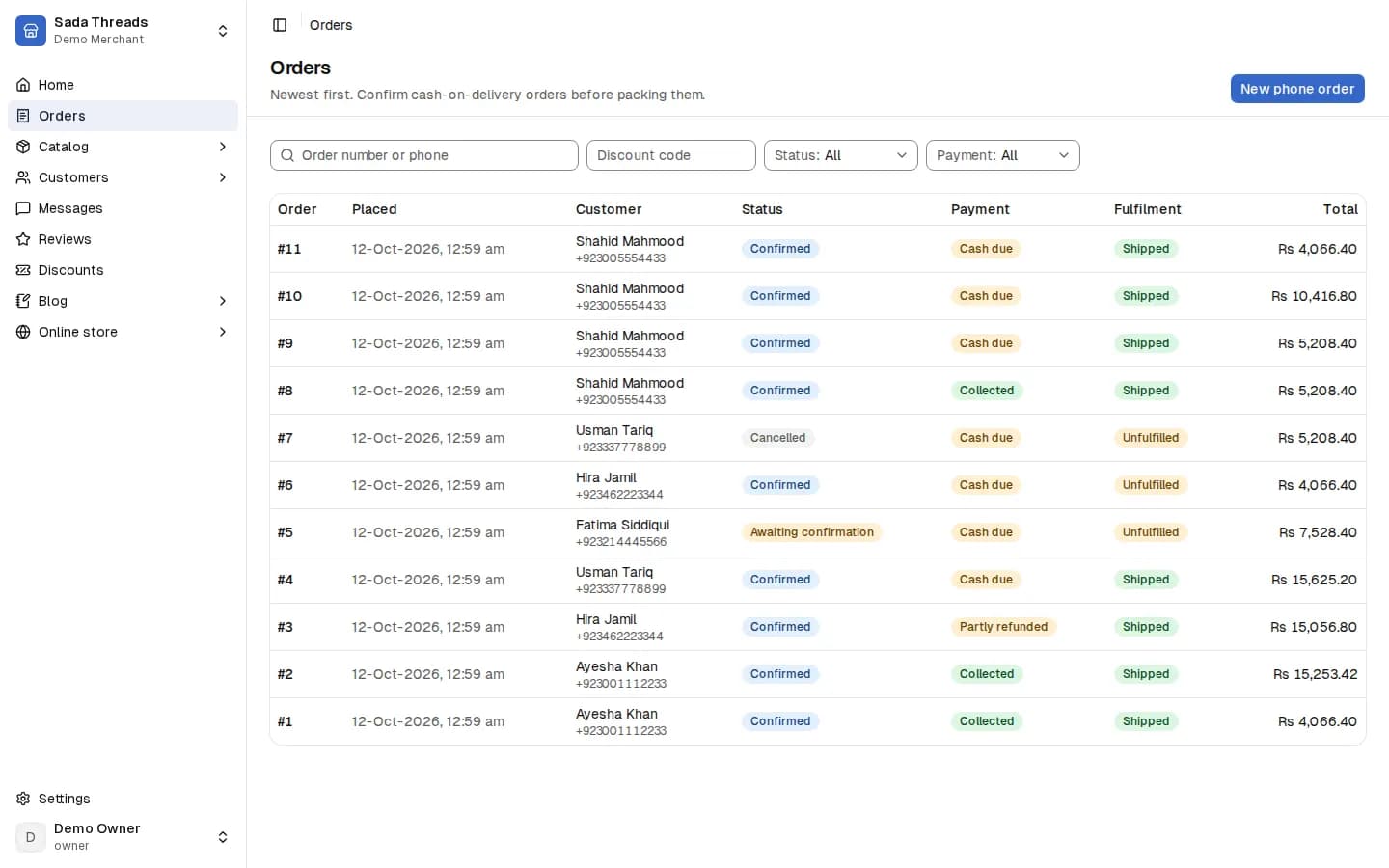
Confirming orders does more than anything else in this guide to cut returns. It weeds out orders that were never real, and it reminds genuine buyers what they ordered and what they will pay. Do it within a few hours of the order, while the buyer still remembers placing it.
In devhelp, each cash order has a private confirmation link. From the order screen you send it to the buyer by WhatsApp or SMS in one tap, using a pre-written message you can edit. The buyer opens the link, sees their order and the amount to pay at the door, and confirms. The link works once and expires after 48 hours. If a buyer confirms by phone instead, your team can confirm the order themselves.
Assalam o Alaikum Ayesha, thank you for your order from Rangrez!
Order 1042: Karachi cotton kurta, size M
Amount to pay at the door: Rs 3,700, including Rs 200 delivery
Delivery to Gulberg III, Lahore, in 3 to 5 working days
Please tap the link below to confirm your order, or reply here if anything needs changing.
Paste the private link on its own line at the end. Keep it short and friendly, use the buyer’s name, and always give the full amount and the delivery time.
When a buyer does not reply
- Send the message, then wait a few hours.
- No reply? Call once, at a time they are likely to pick up.
- If there is still no answer after a second try, hold the order rather than dispatching it. Cancel it after a day or two, with a short message saying so.
When a buyer wants to change something
Sometimes the reply to a confirmation message is a change: a different size, another colour, a new address or a later delivery day. That is a good sign: they still want the order. Make the change before you pack, repeat the new total and delivery time back to them, and only then dispatch. If the item they now want is out of stock, say so straight away and offer an alternative rather than sending the original and hoping.
Show buyers what they will get
Many refusals start on the product page. The item looked different from what arrived, or the rider asked for more than the buyer expected to pay.
Show the product honestly
- Photos from the front, back and side, plus a close-up of the fabric or finish, in daylight.
- Measurements in a size guide, not just S, M and L.
- The real colour. If the camera changes it, say so in the description.
- Material and care, in plain words.
Tell buyers exactly what the rider will collect
Show the delivery charge at checkout and repeat the full amount in your confirmation message. If you add a COD fee, name it. In devhelp checkout, delivery is calculated from the buyer’s province before they place the order, so the total they see is the total the rider collects.
Collect an address a rider can find
Parcels also come back because the rider could not find the house or reach the buyer. Ask for what a rider needs: a working mobile number, the city, the house and street, and the area, sector or block. A landmark helps outside the big cities. devhelp checkout asks for the mobile number first and tells the buyer that the rider will call it before delivering, which nudges them to give a number they will answer.
If an address looks incomplete when you confirm the order, ask for the missing detail in the same message. It takes a minute, and it is far cheaper than a parcel that travels to Multan and back.
Promise a delivery time you can keep
The longer a parcel takes, the more likely the buyer is to refuse it. Dispatch confirmed orders the same or next working day, and give a delivery estimate that matches your courier’s real performance to that city. Tell a buyer “3 to 5 working days” and deliver on day 4, and they are happy. Promise “2 days” and take a week, and many refuse.
Buyers who keep refusing
A small number of buyers refuse parcel after parcel. You don’t have to keep sending them stock and hoping.
devhelp recognises returning buyers by email and phone number, and shows each buyer’s delivered and returned parcels beside their name on the order. Before you dispatch, glance at that record. Several returns and no deliveries is a warning sign. Ten deliveries and one return is a good customer.
For buyers with a history of refusals, you can:
- Ask for payment online. If they pay by card at checkout, there is no cash to refuse at the door. With devhelp, card payments go through Safepay into your own account. See our guide to accepting card payments.
- Ask for the delivery charge in advance. Some stores ask these buyers to send the delivery charge in advance by bank transfer, so a refusal at least covers the courier.
- Call before dispatch. A short, polite call often settles whether the buyer still wants the order.
- Decline the order. If someone has refused several parcels in a row, it is fine to cancel with a polite message.
Packing, couriers and follow-up
Some parcels come back for reasons that have nothing to do with the buyer.
- Pack for rough handling. A crushed or damp parcel is easy to refuse. Use a waterproof flyer and a box for anything fragile.
- Label clearly. Full address, landmark and the buyer’s mobile number, printed rather than handwritten where you can.
- Track every parcel. In devhelp each parcel records the courier and the tracking number, and the buyer gets a tracking link, so you can see when a parcel is stuck.
- Follow up on failed attempts. When the courier marks a parcel as undelivered, message the buyer the same day and ask the courier to try again before it is sent back.
- Compare couriers by how many parcels they deliver. A cheap courier with more failed deliveries can cost more overall. Our guide to choosing a courier explains how to compare them.
When a parcel does come back
Check it the day it arrives
Open the parcel, inspect the item and note its condition.
Put it back on sale
In devhelp, receiving a returned parcel adds the item back to your stock, so it is available to the next buyer straight away.
Record the reason
Add a note on the order saying what the courier and the buyer told you. You will need it for your weekly check.
See it on the buyer’s record
The returned parcel appears in the buyer’s history, so the next time they order you can see it before dispatching.
A twenty-minute weekly routine
Pick the same day each week, set aside twenty minutes and work through this list:
Weekly returns review
- Work out the return rate for the latest finished dispatch batch.
- List the products with the most returns and read the reasons.
- List the cities with the most returns.
- Check how many orders were dispatched without confirmation, and why.
- Look at buyers with more than one returned parcel this month.
- Check that every returned parcel has been received and restocked.
- Choose one change to try this week, such as new photos for one product or calling unconfirmed orders.
Change one thing at a time. If you change the photos, the courier and the delivery promise in the same week, you will not know which one worked. Keep a simple note of what you changed and when, next to the weekly return rate, so that after a month you can see which changes moved the number and which did not.
Common mistakes
- Measuring returns against the wrong week, so the rate jumps around and nobody trusts it.
- Dispatching orders nobody has confirmed because it feels like a lost sale.
- Not telling buyers about the delivery charge or COD fee until the rider asks for it.
- Promising fast delivery the courier cannot meet.
- Leaving returned parcels unopened for days, so stock is missing from the store.
- Changing several things at once and not knowing what helped.
Questions
What counts as a returned parcel?
A parcel that was dispatched and came back without being delivered, whether it was refused, the buyer could not be reached or the address could not be found. Orders cancelled before dispatch, and items sent back after delivery, are tracked separately.
Should I stop offering cash on delivery?
For most Pakistani stores, you would lose more in sales than you would save on returns. Keep COD, confirm orders before dispatch, and offer card payment alongside it for buyers who prefer it or who have refused parcels before.
How quickly should I confirm an order?
Within a few hours, while the buyer still remembers ordering. Then dispatch confirmed orders the same or next working day.
Does devhelp send confirmation messages automatically?
Not yet. From the order screen you send a pre-written WhatsApp or SMS message with the buyer’s private confirmation link in one tap, and you can edit it before sending.
Can I block a buyer who keeps refusing parcels?
Not directly, but you can see each buyer’s delivered and returned parcels before you dispatch, and you can cancel an order with a polite message or ask for payment online first.
Who pays when a parcel comes back?
The seller usually pays the delivery charge and any return charge set by the courier. Check your courier’s rate card for the return charge.