Launch
Your store launch checklist
Go through your store the way a customer would, and fix what you find before your first real order arrives.
Why check before you launch
The first customers who find your store decide quickly whether to trust it. They look at the price, the photos and the delivery terms, and if anything is unclear they either message you or leave. Most of what goes wrong in a new store’s first weeks can be caught before launch: a price with no delivery charge, say, or a returns policy nobody got round to writing.
This guide goes through the store in the order a customer does: the product and its price, then delivery, checkout and what happens after they order. The checklist at the end is something you can finish in an evening.
Prices that show the full cost
The most common question in a Pakistani shop’s inbox is some version of “how much in total?” A customer paying cash wants to know exactly what to hand the rider. Make that number easy to find.
Show delivery before checkout
Decide how you charge for delivery and say it on the product page, not only at checkout. A short line under the price is enough: “Delivery Rs 250 in Punjab, Rs 350 elsewhere. Free on orders over Rs 6,000.” Nobody should reach checkout and get a surprise.
In devhelp shop you set delivery charges by province, with a rate for each zone, and you can add a free-delivery threshold. Checkout then works out the charge from the address the customer enters.
Decide on a COD fee
Couriers charge you for collecting cash. You can absorb that cost in your prices, or add a separate COD fee at checkout. Either is fine, as long as the customer sees it before they order. If you add a fee, say so next to the delivery charge.
| Approach | What the customer sees | Works well when |
|---|---|---|
| Delivery included in the price | One price, “free delivery” | Your products are similar in size and your margins can carry the delivery cost |
| Delivery charged by province | Product price plus a delivery charge at checkout | You ship across the country and costs differ by region |
| Free delivery above a threshold | A delivery charge on small orders, none on larger ones | You want customers to buy two items instead of one |
To work out what an order really costs you once courier charges and returns are counted, read what one COD order really costs.
Photos that help a customer choose
Customers can’t pick the product up, so your photos have to answer what they would ask if they were standing in your shop. What colour is it really? How big is it? What does the back look like? You don’t need more than a phone camera.
- Use daylight. Shoot near a window during the day and turn off yellow room lights, which change the colour.
- Use a plain background. A white wall, a sheet of card or a plain bedsheet keeps the attention on the product.
- Show every angle. Front, back, side and a close-up of the detail customers ask about: the embroidery, the fabric, the charging port, the label.
- Show the size. Photograph the product worn, held or next to something familiar, such as a hand or a phone, so customers can judge it.
- Keep it consistent. When every product has the same background and light, the whole store looks tidy.
Descriptions and size guides
A description should cover what the photo cannot: material, measurements, what is included and how to care for it. Write it the way you would explain the product in chat, in short sentences. For clothing, add a size guide with measurements in inches and say how the sizes run (“runs small, order one size up”). For electronics, list what is in the box and which devices it works with.
Delivery and returns pages
A delivery page and a returns page answer most of the questions you get in chat. Write them before launch and link them from the footer and from your product pages.
Delivery page
- How long delivery usually takes, by area. Give a range you can keep, such as “2–4 working days in major cities, 4–7 days elsewhere”.
- When you dispatch: for example, “orders confirmed before 3 pm go out the same day”.
- Delivery charges by province, any free-delivery threshold and any COD fee.
- How the customer will hear that the order is on its way, and how to track it.
Returns page
In Punjab, the Consumer Protection Act 2005 requires a seller’s return and refund policy to be disclosed to the buyer clearly before the sale is completed. A clear returns page linked from every product page covers that, and it answers what customers ask before ordering anyway. Put in:
- Which items can be returned or exchanged, and which cannot (for example, stitched or altered clothing, or opened cosmetics).
- How many days the customer has to ask for a return or exchange.
- What condition the item must be in, such as unused with tags attached.
- Who pays for the return delivery.
- How refunds are paid, and roughly how long they take.
- How to start a return: which number or email to contact, with the order number.
devhelp shop starts every new store with five pages: About, Contact, FAQ, a shipping policy and a refund and returns policy. Contact is published from the start. The other four begin as drafts, so rewrite them in your own words and then publish them.
What the customer sees after ordering
A buyer who knows exactly what they ordered is more likely to accept the parcel. Go through each screen and message they get after checkout.
The order confirmation page
After checkout the customer sees their order with its number, items, total and delivery address. Check the details are right and the total is what they expected to pay.
Confirming a cash order
For COD orders, send the customer the confirmation link by WhatsApp or SMS from the order page. They confirm, and you dispatch knowing they are expecting the parcel.
Dispatch and tracking
When you hand the parcel to the courier, add the courier and tracking number. If you set your courier up with a tracking link, the customer can follow the parcel from their order.
Messages at each step
Each order has pre-written WhatsApp and SMS messages for placed, confirmed, dispatched and delivered. You send them from your phone with one tap. Read them before launch and change the wording so they sound like you.
Finishing touches that are easy to miss
Some things you only notice when someone who doesn’t work in your shop looks at the store.
How your store appears in search and in shares
Every page and product has a title and description for search engines and for the preview that appears when someone shares your link on WhatsApp. Write them in plain words a customer would search for: “Firoza 3-piece unstitched lawn suit” beats “Product 14”. Your store also publishes a sitemap so search engines can find every page.
Contact details customers can use
Put a phone number or WhatsApp number and an email address on your Contact page and in the footer. Customers who are about to pay cash for something they have never touched want to know there is a real person to reach. If you have a shop or office, say which city you are in.
A launch offer, if you want one
A discount code gives you something to announce. You can make it a percentage or a fixed amount off, or free delivery, and limit it by dates, by a minimum order or by the number of uses. Keep it to one code and one offer, with an end date.
Then ask a friend who has never seen the store to open the link on their phone and buy something. Watch where they hesitate. Write down every question they ask, then add the answer to the product page or FAQ.
Run a test order from start to finish
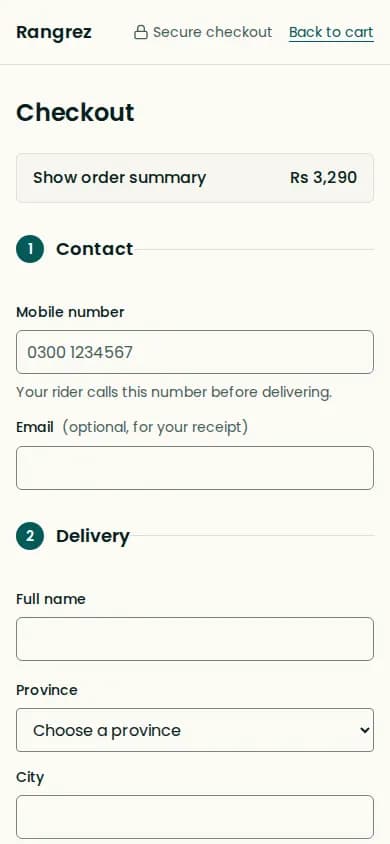
Before you launch, place an order the way a customer would, on your phone. That way you see exactly what they see.
- Open the store on your phone from your Instagram bio link, not from the dashboard.
- Find a product through a collection and through search.
- Add it to the cart, change the quantity, and check the price and delivery charge.
- Check out with a real address outside your city and choose cash on delivery.
- Open the order in the dashboard. Send yourself the confirmation link and confirm it.
- Print the packing slip, add a courier and tracking number, and mark the parcel dispatched.
- Mark it delivered, then try a return so you know how returned stock goes back into inventory.
- If you take card payments, repeat the checkout with a card payment, then refund it from the order.
Request your launch
Once you have ticked off the checklist below, request your store’s launch from the dashboard. A new store stays private, showing “Opening soon”, until devhelp reviews the launch request. The review checks that the store is complete and follows the terms.
Before you request launch
- Logo, colours and home page match your brand on both phone and desktop
- Every product has a price, stock and at least three photos
- Photos are taken in daylight on a plain background, showing front, back and detail
- Each product shows its size or measurements
- Clothing has a size guide; electronics list what is in the box
- Delivery charges are set for every province you ship to
- Free-delivery threshold, if you offer one, is set and mentioned on product pages
- COD fee decided, and stated on product pages if you charge one
- Card payments connected through your own Safepay account, if you accept cards
- Delivery page says how long delivery takes and when you dispatch
- Returns page says what can be returned, within how many days and how
- About and Contact pages are written in your own words
- FAQ page answers the questions you are asked every week
- Policy pages edited and published
- Your courier is saved with a tracking link
- Order messages for WhatsApp and SMS read and adjusted
- A full test order placed on a phone, confirmed, dispatched, delivered and returned
- Store link added to your Instagram bio and WhatsApp Business profile
Common mistakes
- Showing a price without delivery, so the customer finds a higher total at checkout.
- Adding a COD fee at checkout that the product page never mentioned.
- Using photos taken under yellow light, so the colour at the door is not what the customer expected.
- Publishing the template’s draft policies without writing your own.
- Promising next-day delivery everywhere when the courier cannot always meet it.
- Skipping the test order and finding the problems with your first real customer.
Questions
Should delivery be included in my prices or charged separately?
Either works. Include it if your products are similar in size and your margins allow; charge by province if costs differ a lot across the country. Whichever you choose, show the delivery charge on the product page.
Do I need a returns policy?
Yes. Customers ask about returns before ordering, and in Punjab the Consumer Protection Act 2005 requires a seller to disclose the return and refund policy clearly before the sale is completed.
How many photos does a product need?
At least three: the front, the back or side, and a close-up of the detail customers ask about. Add a photo that shows the size, worn or next to a familiar object.
Can I charge extra for cash on delivery?
Yes, you can add a COD fee at checkout. State it on the product page too, so the customer knows the full amount before they order.
When should I ask for my launch review?
Request your launch once the store is complete, after you have worked through the checklist in this guide.
What does a customer see after they order?
An order page with the items, total and delivery address. For COD orders you can send a confirmation link, and once you add tracking the customer can follow the parcel from their order.